
blog16

Want To Trade Forex Like An Expert? Control Your Environment

Why  Building A Supportive Forex Trading Environment Is Important

What do I mean by supportive trading environment? I mean that no one exists in a vacuum. Many things outside the actual forex market itself — from the physical environment you trade in to your personal circumstances at the time you are trading — can impact your trading performance. Maybe you have skeptical family members that are giving you a bad case of performance anxiety. Maybe you don’t have enough funds in reserve, which causes adverse anxiety and pressure that impacts your performance. Whatever the reason may be, the outside world impacts your performance just as much as market conditions.

Top Tip: The Outside World Matters

Knowing what outside factors impact your trading performance — and setting up your environment to support your best performance — can be a good way to improve your trading.


Open Exness Demo Account


Tags:

AUD, Brexit, Brexit, Banks, CAD, CHF, CNH. currency hedging, CZK, Donald Trump, EU EUR, forex trading, GBP, Global, Growth, Fears, Gold Prices, Government Shutdown, HKD, Is forex trading profitable, JPY Leverage, Mean Reversion, MXN, NOK, NZD, Passive income, popular strategies, Risk Management, RUB, Safe, haven currencies, second referendum, SEK SGD, Silver, Price, technical indicators, trading account, Trading Basics, trading psychology, Trailing Stop, trump wall, TRY USD, USD Price, Chart, XAG, XAU, ZAR,


blog15

Want To Trade Forex Like An Expert? Your Trading Log Is Key

Why Study Your Trading Log?

Just as with keeping a journal, downloading and analysing your trading log — or the record of your trading history recorded on your trading platform — can be key to gaining valuable insights into the forex market.

You might notice, for example, that while you’ve opened many different positions on many different currency pairs over a certain period of time, only one or two (or none) turned a profit for you. This might be a sign that you are spreading your attention over too many trades and, thus, you should focus on fewer. On a similar note, you might find that you trade best early in the morning or late at night.

These are just examples, of course. The insights you uncover will, of course, be specific to you. Analyzing your past performance is key to discovering them.  

Top Tip: Studying Your Trading Log Can Be a Great Path To Growth

Your trading log can help you discover everything from the trading style that works best for you to what currency pairs or commodities you do best with. Ignore it at your peril.

Open Exness Demo Account


blog28

Do Forex Signals Really Work?

Do Forex Signals Really Work? What We Tell Our Own Clients

If you've spent any time in forex Telegram groups, you've seen the promises: "93% win rate," "200 pips this week," "copy my trades and get rich." As an Exness Introducing Broker working with thousands of traders since 2006, we get asked constantly: do forex signals actually work? Here's the honest answer, based on what we've actually seen play out in our clients' accounts — not marketing talk.

The Short Answer

Some signals work. Most don't — at least not consistently. The signal itself is rarely the deciding factor in whether a trader makes money. What actually determines the outcome is what the trader does around the signal: position sizing, stop-loss discipline, and whether they understand why the signal was given in the first place.

What We've Actually Seen

Over the years, working with active traders on our rebate program, a clear pattern has repeated itself:

  • Traders who blindly copy signals with no risk management tend to blow up their accounts within weeks — even when the signal provider's historical win rate looked good on paper.
  • Traders who use signals as one input alongside their own analysis — checking the reasoning behind a signal, sizing positions conservatively, and using stop-losses — do noticeably better, whether or not the specific signal was "correct."
  • Free signal groups with no verified track record are the riskiest category. If a provider can't show a real, broker-verified trading history (not just screenshots), treat every signal as unverified.

Why Signals Fail Even When They're "Right"

This is the part most articles on this topic skip. A signal can call the market direction correctly and still cost you money, because:

  • Position sizing mismatch: a signal built for a $10,000 account with a 50-pip stop loss can wipe out a $200 account in one trade.
  • Entry timing lag: by the time a signal reaches you (especially in busy Telegram groups), the price may have already moved past a favorable entry.
  • No exit plan: many signals give an entry and take-profit, but no plan for what to do if the market stalls or reverses before either level is hit.

A Better Alternative: Automate Your Own Rules

Instead of relying on someone else's signal, many of the traders we work with have moved toward Expert Advisors (EAs) — automated strategies that follow a fixed, tested set of rules on your own account, with your own risk settings. This removes the guesswork of "is this signal provider trustworthy today?" and replaces it with a system you can actually test and understand. If you're curious about this approach, our Exnessfarsi YouTube channel covers indicator and EA basics for Persian-speaking traders.

How to Evaluate Any Signal Provider (Free or Paid)

  1. Ask for a broker-verified track record (MyFXBook or similar), not just screenshots
  2. Check whether they specify stop-loss and position size, not just entry/target
  3. Test on a demo account first, for at least a month, before risking real funds
  4. Never risk more than 1–2% of your account per signal, regardless of how confident the provider sounds

The Bottom Line

Forex signals aren't a shortcut to consistent profit — they're, at best, one input into a broader trading process that still requires risk management and a clear plan. Whether you use signals, an EA, or your own analysis, the trading costs you pay on every position are real either way. That's exactly why we built our Exness cashback program — so that regardless of how you decide to trade, you get some of that cost back every month.

Want to learn more about reducing your trading costs directly? Check out our About page to see how our rebate program works, or read our full Exness Broker Review.

blog30

Stochastic: What’s it Really Showing You?

Ever heard the expression “getting ahead of the curve?” In trading, this cliche perfectly reflects what every trader wishes they could consistently do. In addition to fundamental analysis, you might turn to charts to forecast price moves. A big part of using charts to make sense of the markets are indicators, but are they really any good? Many traders turn to the Stochastic indicator to check overbought or oversold levels, so just what insights does Stochastic analysis really offer, and how can you use these insights to determine when to open a position?


Here’s an overview of this popular indicator, why you might be struggling to use it, and some top tips that will help you avoid misinterpreting market moves.

Get free access to our trading platform and hundreds of indicators

Overbought and oversold

The terms overbought and oversold describe a period where there has been significant movement in price without much pullback or reversion. Simply put, a rise or fall that doesn’t deviate far from the trend line.

What goes up…! You know the saying. Price trends can’t last forever. They eventually reverse, and trading close to that point of reversal is one way you can maximize your profits. In traditional technical analysis, traders expect overbought or oversold currency pairs to reverse, but that’s not always the case and it can be quite an expensive realization. To constantly set your trades based on the Stochastic indicator will yield mixed and likely disappointing results.

How to read the Stochastic

If you’ve already signed up with Exness, then you have access to a trading platform and a risk-free demo account. This is the perfect way to get familiar with any of the free and paid indicators available. Open up your platform and go to the Navigator pane on the left. Scroll down and then drag the Stochastic folder to the chart. A section will appear below the price chart with two lines tracing along, above, and below a central range.

The concept is fairly simple. The lower horizontal line represents a value of 20. The upper horizontal line is 80. Whenever the tracing line breaches 80, it indicates a possible overbought status, and traders expect a price correction. Likewise, if the lines cross below the 20-mark, it signals a possible oversold status, and a reversal might be imminent.

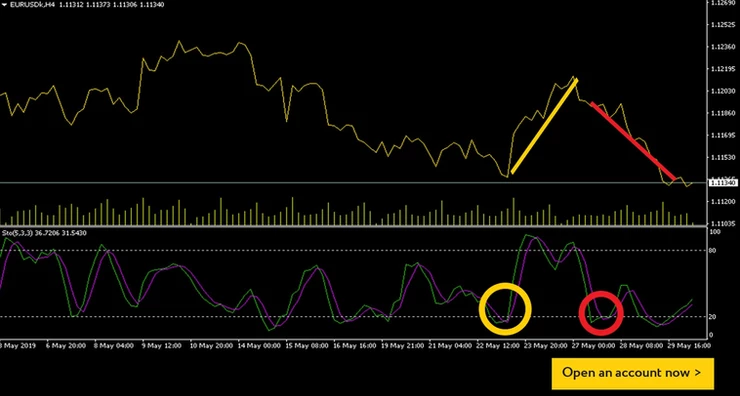
In the above EURUSD example, a downtrend started on May 19 and crossed the 20-line on May 22 [yellow]. Traders using the Stochastic indicator would normally take this as a sign of overbought, and they would set a buy order with the expectations of a reversal. They would consequently be very pleased with the rise that followed. Just five days later, Stochastic indicated another oversold status [blue], but traders clicking the buy buttonprobably lost whatever profits they’d achieved the previous week. So, what’s going on?

Indicators are not fortune-tellers

FX News does not recommend using the Stochastic indicator as a stand-alone forecasting strategy. Indicators are best used to confirm theories, not to create them. Having said that, Stochastic is one of the best indicators a trader can use, but you might consider adding a little common sense to the mix. In the yellow example above, you can see that the price line and the Stochastic lines match rather well in the days preceding the oversold signal—and continue to do so after the fact. The perfect example of how a Stochastic indicator can forecast a reversal!

The blue example a few days later shows a clear divergence. The Stochastic line falls dramatically in a complete reversal from overbought to oversold, but the price line barely moves in comparison. Consider that a warning sign! Another common indicator is that the reversal usually comes when the rise or fall happens in a short period of time. Watch out for steep peaks and valleys that accompany the overbought/oversold range.

Top trading tips for advanced traders

Although we’ve used a price line to better illustrate the price moves in the chart image, FX News suggests using candlesticks when performing chart analysis. Moreover, Stochastic’s default %K period and slowing is set at 5,3,3, but cautious traders usually use higher numbers. On the top menu, go to Insert > Indicators > Oscillators > Stochastic Oscillator and set to 15,5,5. You can run both settings at the same time to see the differences. Certain settings may work better for certain pairs, so play around with the levels before committing to one.


Test Stochastic on your Exness trading platform

Open Exness Demo Account

Open Tickmill Demo Account

Open FXTm Demo Account

blog27

Your Trading Platform: Balance, Equity, Free Margin and More

As a new trader, have you ever felt a little overwhelmed by your trading platform? Like with most software suites, the first encounter can seem confusing and even demotivating, but don’t worry. When it comes to learning how to use all the trading tools available on your platform, you can master them in a relatively short time just by experimenting with your Exness demo account. However, there are five terms in the lower window of your trading platform that need a little more explanation as they often cause a little confusion for the average newbie.

After you’ve read this article, open up your trading platform and see how these figures interact with your orders and each other. Understanding the numbers and calculations you see on your platform will definitely give you confidence and even help you to place trades that better suit your trading budget.

What the trading platform doesn’t show you

Before we can get to those all-important amounts displayed on the lower section of your trading platform, we need to understand one figure that you can’t see when setting orders. Leverage! Your leverage setting depends on which account you are using. Exness allows you to have multiple trading accounts in a single personal area. This is so you can customize your trading conditions to match the currencies you are targeting.

It’s very hard to target serious profits if you only have limited funds to trade with. For example, if you have $100 in your account, the maximum market position you can have is $100, which won’t generate much profit—unless you catch the beginning of a huge price increase. Exness solved this problem by offering a wide range of leverage options. This way, a trader who funded their account with $100 and has a l:100 leverage setting can effectively open a $10,000 order. Higher leverage means your orders are sensitive to even the smallest changes in market prices, which can create attractive profits, but it can also cause rapid and significant losses. Consider which leverage is right for you very carefully. Now you know about leverage, let’s see how it applies to the amounts shown near the bottom of your trading platform.

Balance

Your account balance is the easiest of the five figures to understand. It is simply the amount of money in your account, without taking into consideration the profits and losses of your current open orders. This number only changes when you deposit, withdraw, or close a trade. It does not react to the second-by-second price shifts.

Equity: (margin + free margin) and/or (balance +/- profit/loss)

Equity is the sum of your balance and your open orders. It shows the amount of funds that you will have if you close all open orders at that moment. Take a look at your balance, then add or subtract the total result of your open orders. That’s equity.

Margin: (Lot x contract size / leverage)

Fore margin is a portion of your trading funds that becomes frozen or temporarily inaccessible whenever you set orders on your trading platform. Trading margin is calculated based on the size of your open orders divided by your leverage setting.

The margin amount shown on your trading platform is not a fee. Think of it like a car rental security deposit. If nothing goes wrong for the duration of your contract, then you get your money back. Likewise with trading, if you choose the right price direction or close the order at the first sign of danger, your margin will remain untouched.

Free margin: (equity – margin)

How much money is available in your trading account for opening more orders? Free margin shows the amount of usable funds and changes as your profits or losses change. The level of free margin on display should always influence how large your orders can be. Keep in mind that the higher the leverage, the lower the margin required for each order.

Margin level (equity / margin) x 100)%

This is a number you should watch to avoid getting stopped out. Stop out is the level at which your broker will start closing your losing positions. So long as your margin level stays above 100%, you’re in control. If, however, you trade with an ECN account and your margin falls to 50%, some of your positions will be closed automatically.

6 key points to remember

Set your leverage based on how volatile your targeted trading pairs are. The larger the volume and liquidity, the higher you can set leverage.Your balance and deposits should reflect your current financial circumstances. Don’t overextend your lifestyle or bank account to trade at a higher level. Follow a risk management strategy and start low and slow.If your trading strategy requires you to raise your account balance on a daily basis, equity will show you when it’s time to close your orders and call it a day.Whenever a trade turn negative, margin will act as a benchmark for the broker to send you a margin call. Note: Margin call is a notification informing you to add funds or close your orders before your funds are depleted).If you are a more conservative investor, try and keep your free margin equal to around 80% of your equity. Overextending your trading activities to the point where a loss could wipe out your funds is a common rookie mistake. A Stop Loss or pending hedging order can ensure that rule remains unbroken, even when you are not monitoring your trades.If your margin level drops close to 100%, consider closing the open orders that seem to have the least potential.

Write what’s right

Remembering all these terms can be tricky, so be sure to put these observations in your trading journal. Take notes on how these tips affect your trading performance. With every learning opportunity, you are one step closer to becoming a professional trader. Set aside some time to explore your trading platform, and expand your trading budget as your experience and confidence increases.

Open Exness Demo Account

Open Tickmill Demo Account

Open FXTm Demo Account