
blog9

3 Ways MetaTrader 5 Has Improved On MetaTrader 4

How can you take something beloved by a global community and make it better? With MetaTrader4, MetaQuotes built a trading platform that has become the standard of retail forex traders around the world.

With the global trading community demanding more customization, greater control, and more capabilities, MetaTrader have gone one better and created a next-generation platform called MetaTrader 5.  

Available with Exness on Demo accounts, we wanted to give you a sneak peek at the features that make MetaTrader 5 special.

Customizable Approach To Trading: New Features In MT5

There’s nothing more frustrating than not being able to get your chart set up the way you want it, or not being able to place your order exactly the way you want it to be placed.

With MT5 a lot of these frustrations have been eliminated.

Timeframes. MetaTrader 5 offers 21 different timeframes, vs just nine in MetaTrader 4. This means you can get exactly the right chart for your trading strategy, rather than having to make do on MetaTrader 4.

Order types. In MetaTrader 5, you can access two additional pending order types, “buy stop limit” and “sell stop limit”. You can find out more about these in our blog post specifically on the subject of pending order types.

What’s more, with MetaTrader 5 subtle changes in the “navigator” pane mean that you can find what you want, when you want, at a far greater speed.

Analysis

The changes to MetaTrader 5 go beyond simple user experience. Improvements to analytics, testing, and tool building demonstrate how much MetaTrader 5 has been created with the experienced trader in mind.

Fundamental analysis. With MetaTrader 5, traders can benefit from access to economic and industrial news right within their terminal, as well as enjoying a economic calendar highlighting upcoming announcements from around the world. These new tools come bundled with MetaTrader 5 right from launch.Technical analysis. With MetaTrader 5, right out of the box traders get access to 38 indicators and 44 analytical objects, versus 30 indicators and 33 analytical objects in MT4, with a vast number of additional solutions available for free via Code Base or for a price from the new Market feature.

Expert Advisors

EAs were always remarkably valuable in MT4 because they allowed traders to automate some or all of their decision-making to a complex algorithm that could analyse trends and place orders.

In MT5 this functionality is further increased, made possible by the highly advanced MQL5 programming language.

Programming. MT5 is designed from the ground up to empower experienced traders to build powerful EAs themselves. With a programming language similar to C++, it is easy for traders to get their heads around the process and start building. At the same time, less experienced will benefit from access to better quality EAs, which they can test and apply.Market. Even more exciting for experienced traders is the new Market feature, which allows traders who have programmed EAs themselves to make money by selling them to the community, right from the terminal.

Using MetaTrader 5 With Exness

It couldn’t be easier to try out the MetaTrader 5 platform for yourself with Exness. Here’s a simple guide the getting started:

Open an MetaTrader 5 trial or MetaTrader 5 real account from your Personal AreaDownload the MetaTrader 5 desktop or mobile terminal from the Exness downloads pageEnter your account details to log in

What’s more, MT5 accounts can now be used with the WebTerminal. Accessible right from your personal area in the left-hand menu, this means you can start trading on MetaTrader 5 without anything to download!

Try it for yourself.
Open an EXNESS MT5 account today.

Open an FXTM MT5 account today.

blog25

How to Use Fibonacci Retracement

In this article, I’m going to show you how to apply Fibonacci retracement levels to a chart and what information it provides. Remember, indicators “indicate” possible price moves and entry-exit points. You’ll still need to interpret the data for yourself, so I’ll show you how to do that too.


What is Fibonacci retracement

Let’s break down the words Fibonacci and retracement to better understand what this tool does.

Fibonacci was an Italian mathematician who discovered a sequence of numbers that occurs in nature. This infinite sequence is created by adding together the preceding two numbers on the list to create the next number. For example: 0, 1, 1, 2, 3, 5, 8, 13, 21, etc.

Retracement refers to how a price trend can sometimes temporarily fall back before continuing in the direction of the trend.

Why is Fibonacci retracing so useful?

The Fibonacci Retracement tool helps traders identify levels for setting Buy Stop Limits or Sell Stop Limits that can activate orders whenever a price retracement occurs. The indicator lines also help when searching for a trading entry point level on a trending price move.

How to set up Fibonacci levels

Open your Exness demo account and let’s apply the Fibonacci tool to a chart. EURGBP often displays volatility. It’s a perfect pair to demonstrate how the Fibonacci tool can help you set a more profitable order prior to a price retracement. On the top menu of your trading platform, set the timeframe to H4 (4 hourly) and display the price as a line.

Go to the top menu >> Insert >> Fibonacci >> Retracement

On the chart, draw a line at the start of a trend to the point of reversal by holding down the left mouse button until you get to the break.

If a retracement occurs, how low will it go? That’s where the yellow lines or levels can help with your forecasting. The displayed Fibonacci levels or lines offer several entry points. Assuming the trend continues, the higher the line value the greater the profit. These entry points levels can be customized, but most traders don’t mess with the defaults. So which level should you choose for your entry point?

Fibonacci retracement entry points

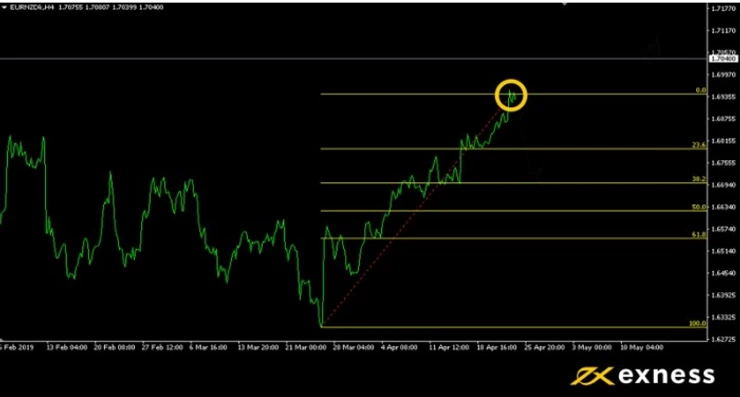
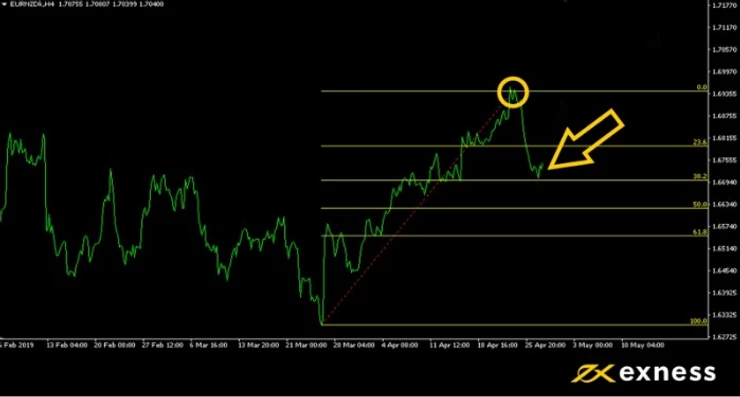
In the example above, EURNZD started a bull run at 4:00 pm on March 26. A retracement began four hours later. The Fibonacci tool displays six levels ranging from 0.0 (no retracement) to 100.0 (full reversal). Choosing the right level is ultimately your decision, but the Fibonacci levels work as an effective guideline or benchmark. Just remember that an indicator is not a time machine and market prices don’t always follow the mathematical rules.

23.6: A small move that happens all the time and offers limited value or improved profitability.

38.2: An accurate forecast at this level creates attractive profits, and the likelihood of it occurring remains quite high.

50.0: Half retracement. Not a tall order by any means, but the improvement to your profit ratio improves significantly—compared to opening a position on the high.

61.8: Entering the realm of more and more unlikely. To catch such a reversal in the middle of a rally is a long shot, but highly profitable when it happens.

Most conservative traders will probably set entry levels between 23.6 and 50.0 but that number will rise as your knowledge and experience grows.

In the example above, the reversal dropped to the 38.2 mark and then continued to rally well beyond the price at the time of drawing the Fibonacci lines.

Top Fibonacci trading tip

Remember, market prices won’t always fit in with Fibonacci levels so perfectly. Many unexpected changes can and will affect your orders if you trade on a daily basis. Most traders agree that the longer the timeframe and greater the price difference, the more accurate the forecast.

Trading indicator tools can be likened to comments on Amazon. You’ll get better results in the long-term if you take more than one into consideration, so work hard and use other indicators together with fundamental analysis.

Test the Fibonacci trading tool on a real or demo account


Open Exness Demo Account

Open Alpari Demo Account


The Breakout Strategy

The Breakout Str

News Release Trading Strategy

News traders trade off economic news release. The Forex market is particularly reactive to economic news, in particular, interest rate news from the G8 countries, as well as unemployment news for each corresponding country. News traders will have to bear in mind that the Forex market movements have already taken in to consideration existing and expected economic news. The sharp movements you see due to economic news are corrections due to unexpected news, either better than expected or worse than expected.

Another consideration to take to heart for potential news traders is that during negative sentiment news reports, currency movements generally head towards lower yielding and perceived safer currencies; USD and JPY in particular.

A good grasp of economics is generally recommended for traders wishing to start news releasing trading.

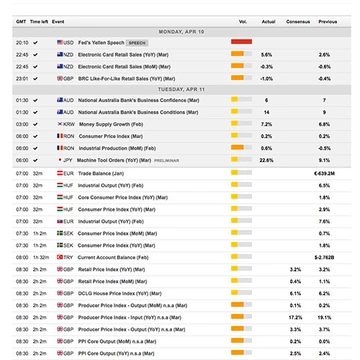
An economic news calendar is highly recommended. Forex Economic calendars show the release date for important economic news such as non-farm payroll, GDP figures and interest rate news. Below is an example of what an economic calendar shows:

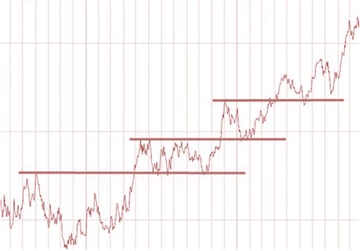
ategy is the break out of a sideways trend. Usually, momentum is greatest on breakout points. A lot of traders take advantage of the breakout strategy when sideways moving prices break the upper or lower limits. Below represents a few breakouts following some periods of sideways tending.

Combine Fibonacci retracement with the Exness cashback rebate program to maximize your profits on every trade.


Ready to apply Fibonacci retracement in live markets? Open your free Exness account today and start trading with one of the world’s most trusted forex brokers.


👉 Open Your Exness Account: https://www.exness.direct/a/t1e8k1e8


Frequently Asked Questions (FAQ)

What is Fibonacci retracement in forex?

Fibonacci retracement is a technical analysis tool that uses horizontal lines to indicate potential support and resistance levels based on Fibonacci ratios (23.6%, 38.2%, 50%, 61.8%, and 78.6%) before the price continues in the original direction.

Which Fibonacci level is most important?

The 61.8% level, also known as the “golden ratio,” is considered the most important Fibonacci retracement level. Many traders watch this level closely as it often acts as a strong support or resistance zone.

How do I draw Fibonacci retracement levels?

To draw Fibonacci retracement levels, identify a significant swing high and swing low on your chart. In an uptrend, draw from the swing low to the swing high. In a downtrend, draw from the swing high to the swing low. Most trading platforms including MT4 and MT5 have a built-in Fibonacci tool.

Does Fibonacci retracement work in forex?

Yes, Fibonacci retracement is widely used and respected in forex trading. However, it works best when combined with other indicators such as RSI or moving averages to confirm signals before entering a trade.

What timeframe is best for Fibonacci retracement?

Fibonacci retracement works on all timeframes, but is most reliable on higher timeframes such as H4, Daily, and Weekly charts where support and resistance levels are stronger and more significant.

blog26

A Trader’s Guide to Closing Orders

This article is dedicated to those of you who already have a trading account but haven’t managed to establish a trading routine yet. There’s so much to learn, and it can sometimes feel overwhelming. There are tutorials that show you how to use the trading platforms, and economic news releases that can help you find a currency pair to trade. What’s hard to find is an explanation of how high you should set your profit goals. Even more elusive is a clear rule for how long you should keep your orders open. Here’s a simple strategy for setting your exit points based on price history instead of profits or losses.

Stopping orders at the right time

If you’ve built your trading confidence on the Exness demo account, then you’ve probably seen some sizable profits and losses. Keep in mind that your trading goal is not to be consistently profitable—that’s not a realistic option. Keeping the total profits above the total losses is something full-time traders usually aim for, and there are many techniques that can help with that. Of course, that’s easier said than done, but there are some areas that more inexperienced traders often overlook. Let’s say, you’ve got an open order on your trading platform. You’re hopefully thinking of setting your Stop Loss and Take Profit levels, but what you might not be sure about is the exit points. This is where the chart timeframes can help. Firstly, just how long are you planning to keep your orders open? It’s the first thing to consider. If you place an EURUSD order for the day, your Take Profit and Stop Loss setting could be very different from an intended month-long order. Here’s why.

Timeframe analysis

Timeframe analysis is primarily used for trend trading. For example, if you are thinking of trading XAUUSD, you might consider sticking to longer timeframes for analysis and speculation. This is because gold has a slow and slightly more predictable rise over the course of each year. It is considered by many traders as a long-term investment option. When you set your exit points, set your timeframe to show the big picture. If you plan to close the order in a month, what were the prices one month ago? Apply this logic to all your trades, then compare the historic price level with the current level of resistance.  In contrast, if you are day trading, don’t expect the prices to go far beyond what you’ve seen over the last 24-hours. Whatever levels prices reached last year shouldn’t influence your short-term orders.

Top trading tip

Ideally, you are looking for trends that are consistent on multiple timeframes. If, for example, both short-term and long-term trends have bullish indicators, a Buy order could be a strong option. If the short-term trend shows bearish tendencies within a long-term uptrend, caution is advised.

Reading price charts is not something that can be learned in a day. Like driving a car, you need to spend time practicing before you take to the highway. Make time to check the timeframes of multiple currency pairs each day. Look at the time period you intend to trade and take detailed notes on price history. How much movement occurred over how much time? Make conclusions and write down why you think a Buy or Sell order is favorable, then go back to previous conclusions and see if you were right or wrong.

As you learn from your mistakes, your perceptions of the market’s ebb and flow will change. Remember, the goal of this strategy is to have more profits than losses. You’ll never win them all, but there’s always room for improvement.

Test and develop your analytical skills risk-free on a demo account

Open Exness Demo Account

Open Alpari Demo Account

Open Errante Demo Account